


Updated for 2026.
Key Points
- You can recover Phantom wallet access only with either your seed phrase, or your seedless sign-in plus your 4-digit PIN.
- Phantom wallet support cannot restore your seed phrase, private key, or PIN.
- If you see a Phantom wallet phone number in ads, DMs, Telegram, or WhatsApp, treat it as a scam attempt.
- After recovery, review connected sites and permissions so old approvals do not follow you forward.
If you want quick definitions for seed phrase, recovery phrase, private key, gas fees, token approvals, and signatures, see the Markets Unplugged Crypto Glossary.
New to wallets in general? Start with the wallet hub article that explains wallet types and how wallets work, then come back here.
Quick Answer
- Seed phrase recovery: Install Phantom on the new device, choose “I already have a wallet”, then recover Phantom wallet access by importing your 12 words.
- Seedless recovery: Install Phantom, choose “I already have a wallet”, sign in using the same email or Apple or Google method, then enter your 4-digit PIN to restore.
- No secret, no recovery: If you have lost both your seed phrase and your seedless PIN, there is no reset process. If you still have access on any device, export what you can and migrate funds to a fresh wallet.
Phantom Wallet Support And Phone Number Scams
This is where many people get trapped after a lost phone.
- Phantom wallet support does not operate through random phone numbers posted on Google results, Telegram groups, or sponsored ads.
- If someone claims they are support and asks for your seed phrase, private key, or a remote screen-share, it is a scam.
- The safest route is always the official Help Center flow, not DMs and not phone calls.
If you searched “phantom wallet phone number”, treat that as a signal to slow down and verify everything before you click.
First Moves If Your Phone Is Lost Or Stolen

- Secure your phone account first, change your device passcode, lock your Apple ID or Google account, and use remote wipe if appropriate.
- Start recovery on a safe device using the correct path below.
- After you are back in, clean up connected apps and permissions.
Recovery On A New Device, Two Paths
Path 1: You Created The Wallet With A Seed Phrase
- Install Phantom from the official app store listing or official browser extension listing.
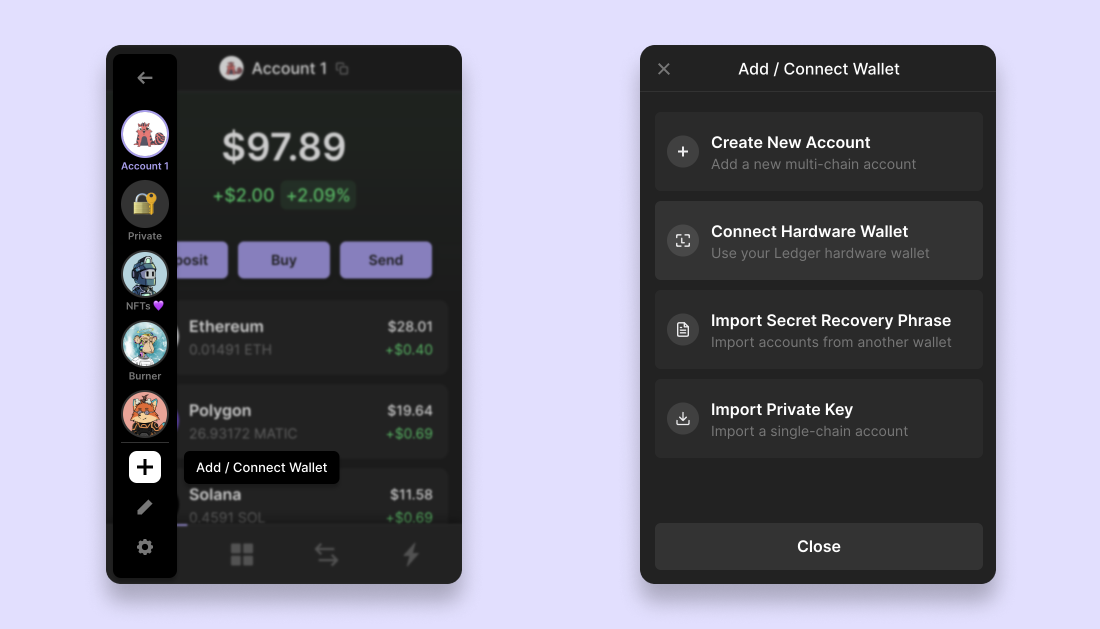
- Open Phantom and select “I already have a wallet”.
- Choose the option to import a recovery phrase.
- Enter your 12 words in the correct order.
- Set a new local password or device unlock.
Notes
- Your seed phrase restores the wallet, but you may need to re-add accounts inside Phantom to see all addresses again.
- Never paste your seed phrase into a website, a Google Form, or a “support” chat.
Path 2: You Created The Wallet With Seedless Sign-In
- Install Phantom and select “I already have a wallet”.
- Continue with the same email, Apple, or Google sign-in method you originally used.
- Enter your 4-digit PIN to complete restore.
- Turn on device biometrics and auto-lock.
Notes
- Seedless recovery still depends on your PIN. If you forget the PIN and have no other access, recovery may not be possible.
- Do not follow instructions from random accounts offering “PIN resets”.
If You’ve Lost Both The Seed Phrase And The Seedless PIN

If you have access on any existing device, treat it as an emergency window.
- Export your recovery details immediately and store them offline.
- Create a fresh wallet with a clean backup.
- Move funds carefully, starting with a small test transaction.
If you have no access anywhere and you do not have the required secret, there is no reliable recovery method.
Post Recovery Checklist
Do this once, and future restores become boring.
- Confirm your backup is correct, readable, and stored offline.
- Review connected sites and disconnect anything you do not recognise.
- On EVM activity, review token approvals and revoke anything you no longer use.
- Keep a small SOL buffer for routine actions so you do not get stuck mid-clean-up.
Common Mistakes
- Confusing an app password with recovery, passwords unlock the app, they do not restore wallets.
- Importing the wrong seed phrase, label backups clearly.
- Trusting a “support” phone number, scams spike during high-stress recovery moments.
- Screen-sharing with strangers, this is how wallets get drained quickly.
Mini FAQ
Can I recover a Phantom wallet without the seed phrase or the seedless PIN?
No. Self-custody means only you hold the credentials needed to restore access.
Will Phantom wallet support restore my wallet for me?
No. Phantom wallet support can guide you, but they cannot restore your seed phrase, private keys, or PIN, and they will never ask you to share them.
Does Phantom have a wallet support phone number?
Phantom does not publish a customer service phone number for wallet recovery. If you see a “phantom wallet phone number” in ads or DMs, assume it is a scam attempt.
I restored but some accounts are missing, what now?
Add accounts under the same wallet. They re-appear because they are derived from your original seed.
If this helped you get back in safely, Alpha Insider is built for the next layer... the habits that stop repeat mistakes. Alpha Insider members get:
➡️ Kairos timing windows to plan entries before the crowd moves
➡️ A full DCA Targets page with levels mapped for this cycle
➡️ Exclusive member videos breaking down charts in plain English
➡️ A private Telegram community where conviction is shared daily
Legal And Risk Notice
This article is for educational purposes only and does not constitute financial advice, investment advice, or a recommendation to buy or sell any asset. Crypto assets can be volatile and transactions are irreversible. Always verify websites, addresses, networks, token approvals, and signature prompts, and never share your recovery phrase or private keys.


Discussion