


Updated for 2026.
If you're looking to store and manage Solana assets, Phantom Wallet is your best bet. It’s simple, fast, and fully in your control - no middlemen, no hassle. Originally built for Solana, it now supports Ethereum, Base, Sui, Polygon, and even Bitcoin, making it one of the most versatile non-custodial wallets out there.
But if you've never set up a crypto wallet before, don't worry. I’ll walk you through everything step by step.
This guide is part of the wallet series. For the full wallet hub with setup guides, comparisons, recovery help, and wallet types, see the Bitcoin and altcoin wallets guide.
If you ever want to double-check a term while you set things up, our crypto glossary for beginners covers the main Bitcoin and crypto slang we use across the site.
Quick Answer
Phantom Wallet is a self-custodial wallet for Solana and other supported networks, including Bitcoin. It lets you send, receive, swap, and connect to apps on desktop or mobile. You can set it up with a recovery phrase, or use seedless login with Apple or Google plus a PIN. The main safety rules are simple… install from official sources, never share recovery details, and test with a small transfer before moving larger amounts.
Key Points
- Phantom is self-custodial, so access is controlled by your wallet security, not an exchange.
- Seedless login uses Apple or Google plus a PIN and is designed to be easier for beginners.
- Supported networks include Solana, Ethereum, Base, Polygon, Sui, Monad, Bitcoin, and HyperEVM.
- Most beginner losses come from phishing links, fake apps, and careless approvals, not the wallet itself.
What is Phantom Wallet and Why Use It?
Phantom Wallet is a self-custodial crypto wallet, which means you own your private keys—not some exchange that can freeze your funds whenever it feels like it. It started as the go-to Solana wallet but has expanded to Ethereum, Base, Sui, Polygon, and Bitcoin, making it a solid all-in-one option for Meme coins, DeFi, NFTs, and token swaps.
Here’s what makes it worth using:
- Fast and lightweight - Runs as a browser extension or mobile app, no bloat.
- Supports multiple blockchains - Solana, Ethereum, Base, Sui, Polygon, and Bitcoin.
- Integrated swaps - No need for external exchanges, swap directly inside the wallet.
- NFT-friendly - View, send, and manage your NFTs with ease.
- Staking support - Earn rewards by staking your SOL tokens.
- Security-first - Full encryption, biometric login, and hardware wallet compatibility.
Now let’s set it up.
💡 Want the edge the public never sees?
The Markets Unplugged members get:
➡️ Kairos timing windows to plan entries before the crowd moves
➡️ A full DCA Targets page with levels mapped for this cycle
➡️ Exclusive member videos breaking down charts in plain English
➡️ A private Telegram community where conviction is shared daily
This isn’t noise… it’s the full playbook.
How to Set Up Phantom Wallet
For Desktop Users (Browser Extension Setup)
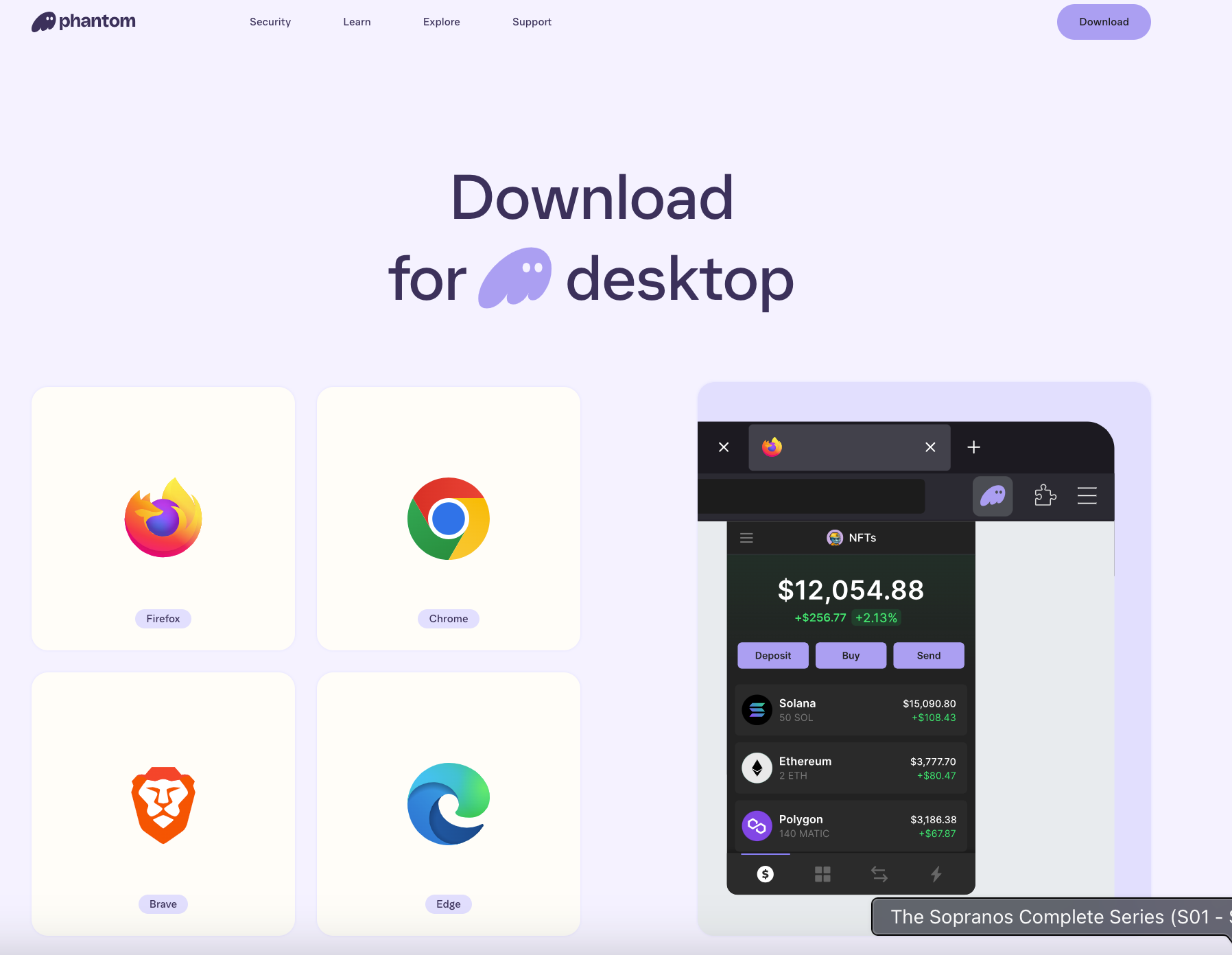
- Download Phantom - Go to phantom.app and install the browser extension (Chrome, Firefox, Edge, or Brave).
- Install & Open - Once installed, click the Phantom icon in your browser toolbar.
- Create a New Wallet - Click “Create New Wallet” and follow the setup.
- Set a Password - Choose a strong password. This protects your wallet locally.
- Backup Your Secret Recovery Phrase - This 12-word phrase is the only way to recover your wallet if you lose access. Write it down and store it offline. DO NOT share it with anyone.
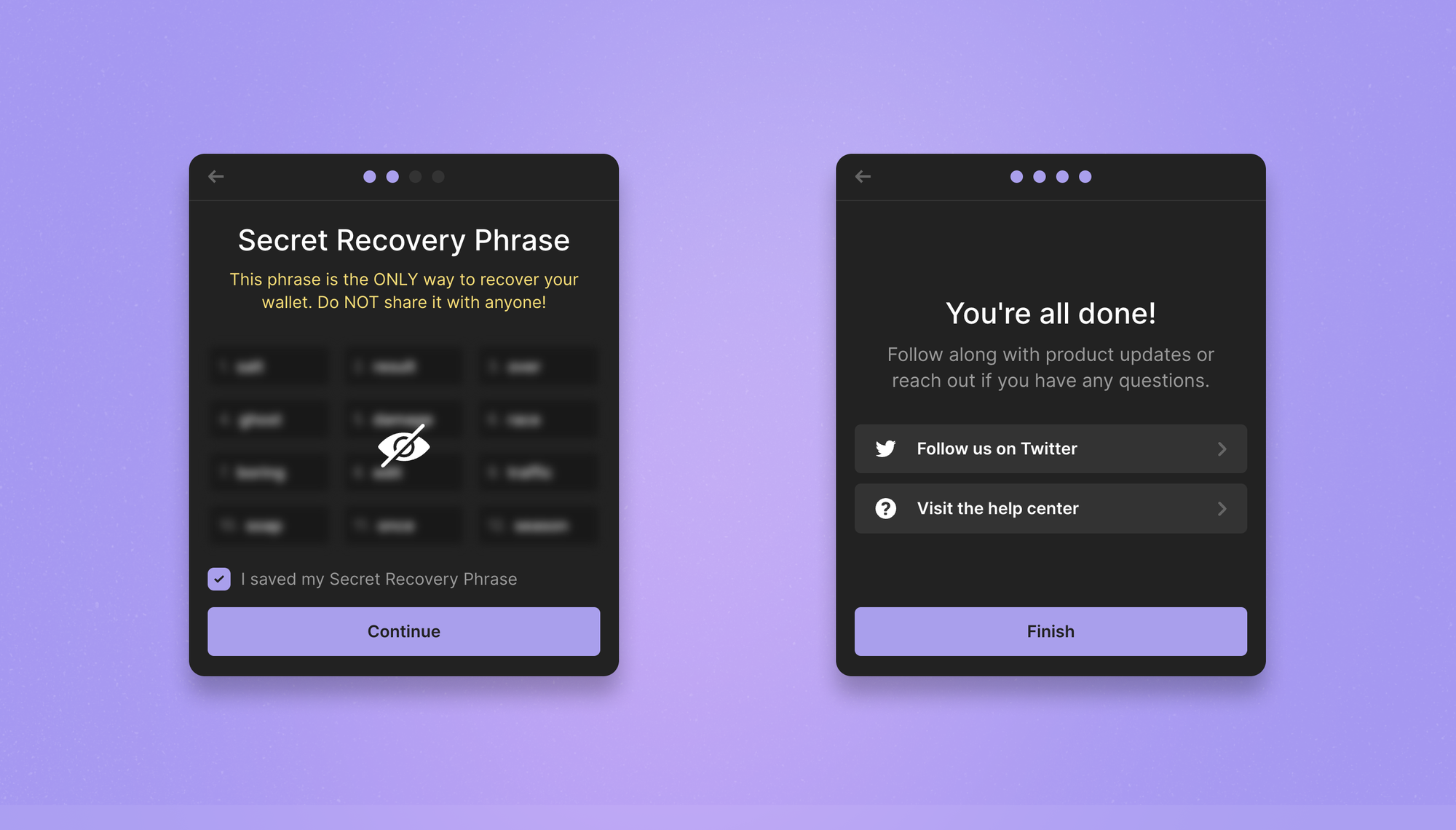
- You’re In! - Your wallet is now set up and ready to use.
🔹 Pro Tip: If you can’t see the Phantom icon, click the puzzle piece in Chrome (top right) and pin it for easy access.
For Mobile Users (App Setup)
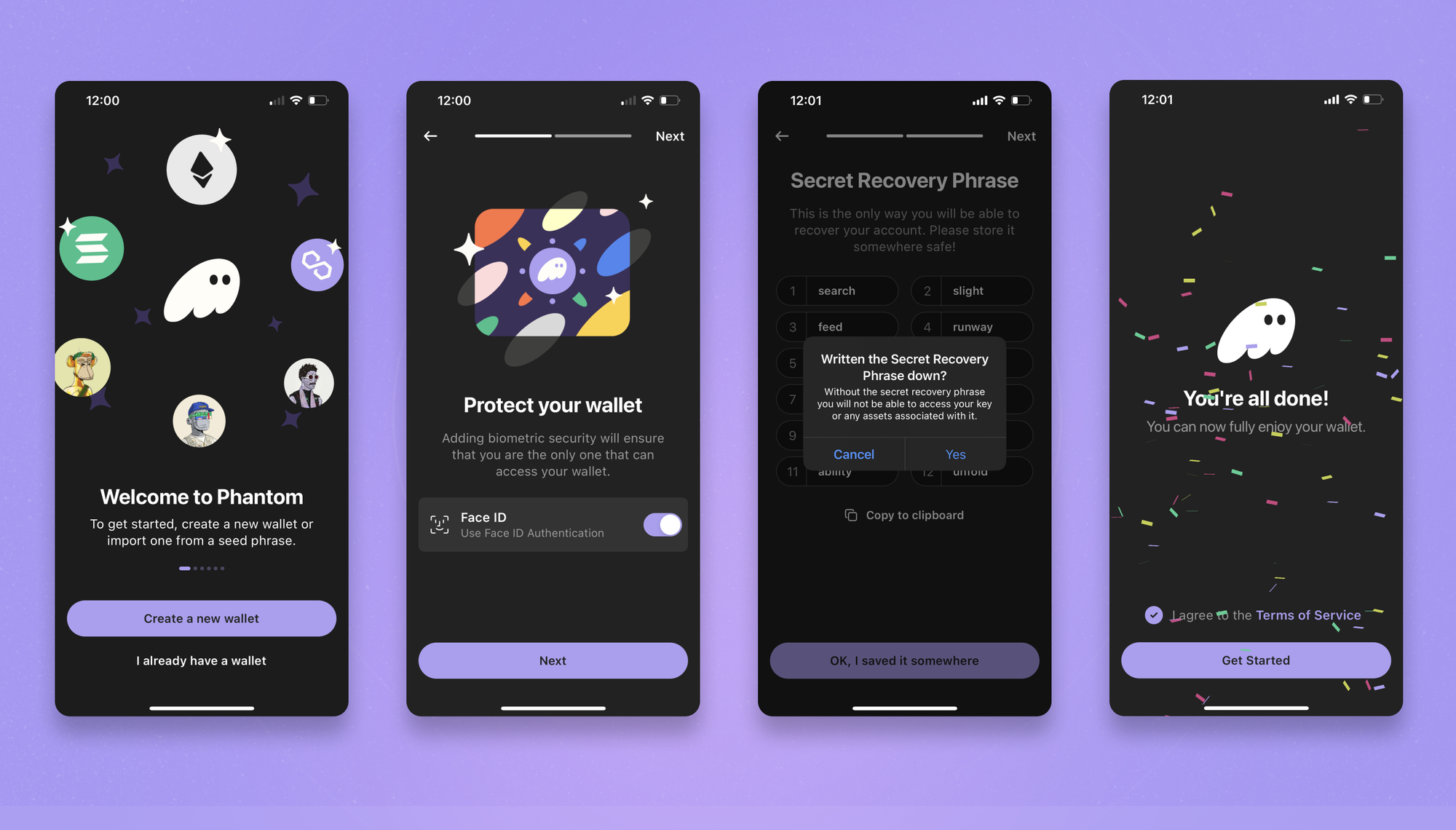
- Download the Phantom App - Head to the iOS App Store or Google Play Store.
- Install & Open - Launch the app and tap “Create a new wallet.”
- Enable Security - Set up Face ID or fingerprint authentication for added protection.
- Backup Your Secret Recovery Phrase - Again, this 12-word phrase is critical. Store it offline and never share it.
- Start Using Your Wallet - You’re ready to deposit, send, and swap assets.
How to Use Phantom Wallet
Now that your wallet is set up, let’s get it funded and functional.
Depositing Funds
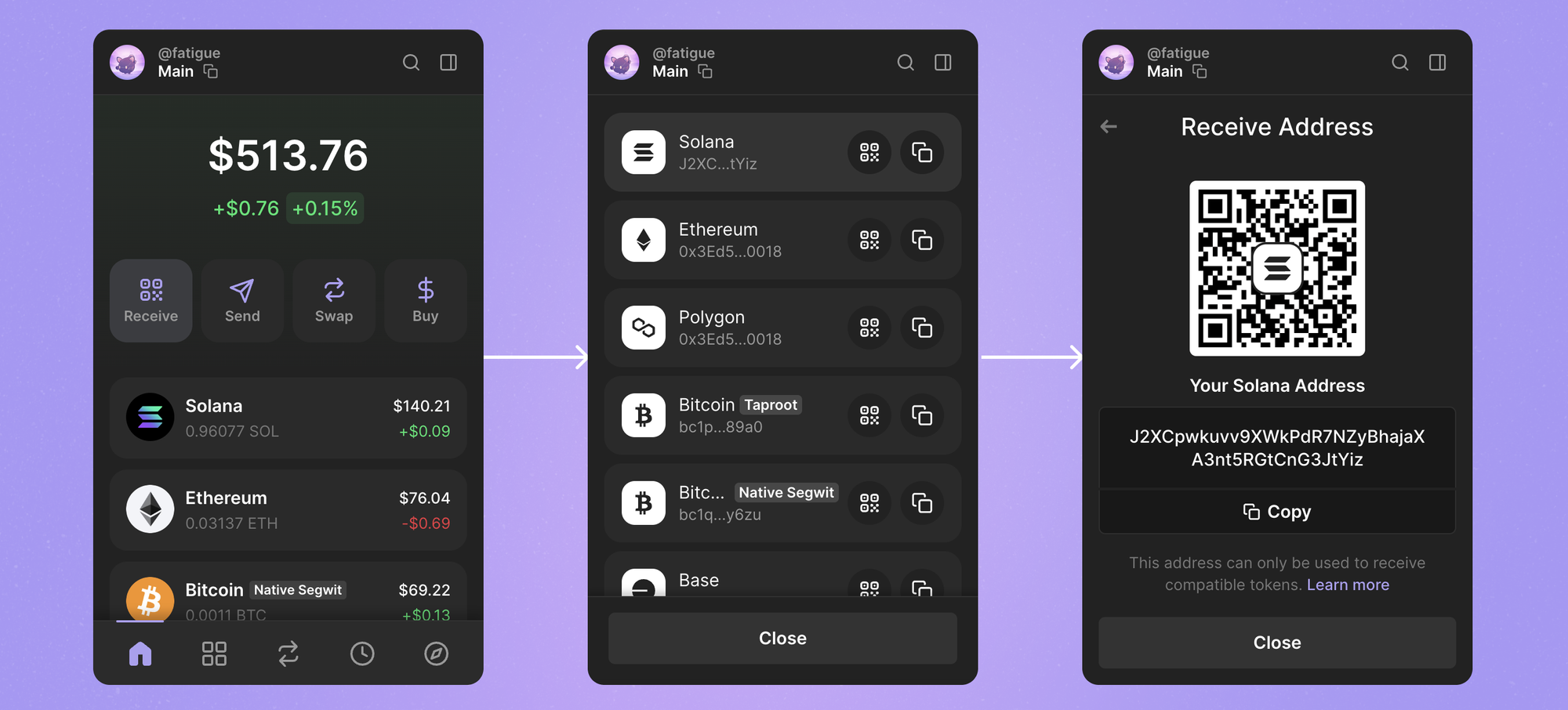
- Open Phantom and tap "Deposit".
- Select the blockchain (Solana, Base, Ethereum, Sui, Polygon, Bitcoin).
- Copy your wallet address or scan the QR code to receive funds.
Sending Crypto
- Tap "Send" and paste the recipient’s address.
- Select the amount and confirm the transaction.
- Approve it, and it’s done.
🔹 Solana transactions are almost instant and cost fractions of a cent. Ethereum fees vary, so check before sending.
Swapping Tokens (Built-In Exchange)
- Click "Swap" inside the wallet.
- Choose the tokens you want to exchange (e.g., SOL → USDC).
- Review the fees and confirm the trade.
🔹 No need to visit an exchange—Phantom lets you swap tokens inside the wallet.
Managing NFTs
- Go to the NFT tab (in the app or browser extension).
- View, send, or list your NFTs directly from Phantom.
🔹 Phantom is one of the best wallets for NFT storage—super clean UI, no clutter.
Gas Fees on Phantom: What to Expect
Like any blockchain transaction, gas fees apply. Here’s a rough idea:
- Solana – Dirt cheap (fractions of a cent).
- Ethereum – Variable ($1 to $50+ depending on congestion).
- Polygon – Low fees (usually under $0.10).
- Bitcoin – Depends on network traffic (expect anywhere from $1 to $20).
🔹 Phantom automatically optimises gas fees, but you can adjust them manually if needed.
Security Tips: Don’t Get Rekt
Your crypto is only as safe as you keep it. Follow these:
✔ NEVER share your Secret Recovery Phrase – If someone gets it, your funds are gone. No support team can recover them.
✔ Use a hardware wallet – If you're holding big funds, connect Phantom to a Ledger for added security.
✔ Enable 2FA on exchanges – If you’re sending assets from an exchange, secure your account.
✔ Verify before connecting to DApps – Fake sites will drain your wallet. Double-check URLs.
✔ Keep Phantom updated – Updates fix security bugs and improve performance.
🔹 Scammers are everywhere. If someone asks for your recovery phrase, they’re trying to rob you.
Mini FAQs
Does Phantom Support Bitcoin?
Yes. Phantom supports Bitcoin alongside Solana and other supported networks.
Can I Use Seedless Login?
Yes. Seedless login uses Apple or Google plus a PIN. You can also choose a traditional recovery phrase setup.
Is Phantom Available On Mobile And Desktop?
Yes. Phantom is available as a browser extension and an iOS and Android app.
What Is The Safest Way To Install Phantom?
Use Phantom’s official download page, then verify the publisher before installing.
What Is The Most Common Beginner Mistake?
Using the wrong network when sending, approving a malicious connection, or installing a fake app. Test with a small transfer first.
Final Thoughts
Phantom is fast, beginner-friendly, and supports everything from Solana activity to holding Bitcoin in the same wallet interface. Whether you're trading meme coins, exploring DeFi, staking, or managing NFTs, it does the job without being complicated. Just stay disciplined with security, avoid suspicious links, and slow down on approvals.


Discussion